
WordPress plugin · for the form plugin you already use
Encrypt Forms
Keep collecting sensitive data. Stop storing it in plain text.
Encrypt Forms encrypts the fields you choose, like Social Security and account numbers, the moment a form is saved. The entry keeps only a mask. Authorized staff reveal one value at a time, and every reveal is logged.
Gravity Forms · Contact Form 7 · WPForms · Elementor Forms · Fluent Forms · Forminator · Ninja Forms · Formidable
Free core + Pro add-on · GPL · multisite-ready · the free plugin makes no outbound calls
1 · Applicant submits
Social Security number
Typed once. Never stored as typed.
2 · What the database holds
Backups, exports and copies get the mask.
3 · Staff on the reveal list
The problem
Every backup is another copy of every sensitive field.
Form plugins save exactly what people type. For a form that collects Social Security numbers, account numbers or health details, that means plaintext in the database, in every nightly backup, in every staging copy, and in every CSV someone exported to check one thing. Disk and host encryption don’t help here, because those copies are readable by design.
How it works
Encrypted on save. Masked everywhere. Revealed by name.
01
Encrypted on save
The real value goes into a separate encrypted vault (XChaCha20-Poly1305, a fresh nonce per value). The entry keeps only ***-**-1234.
02
Masked everywhere
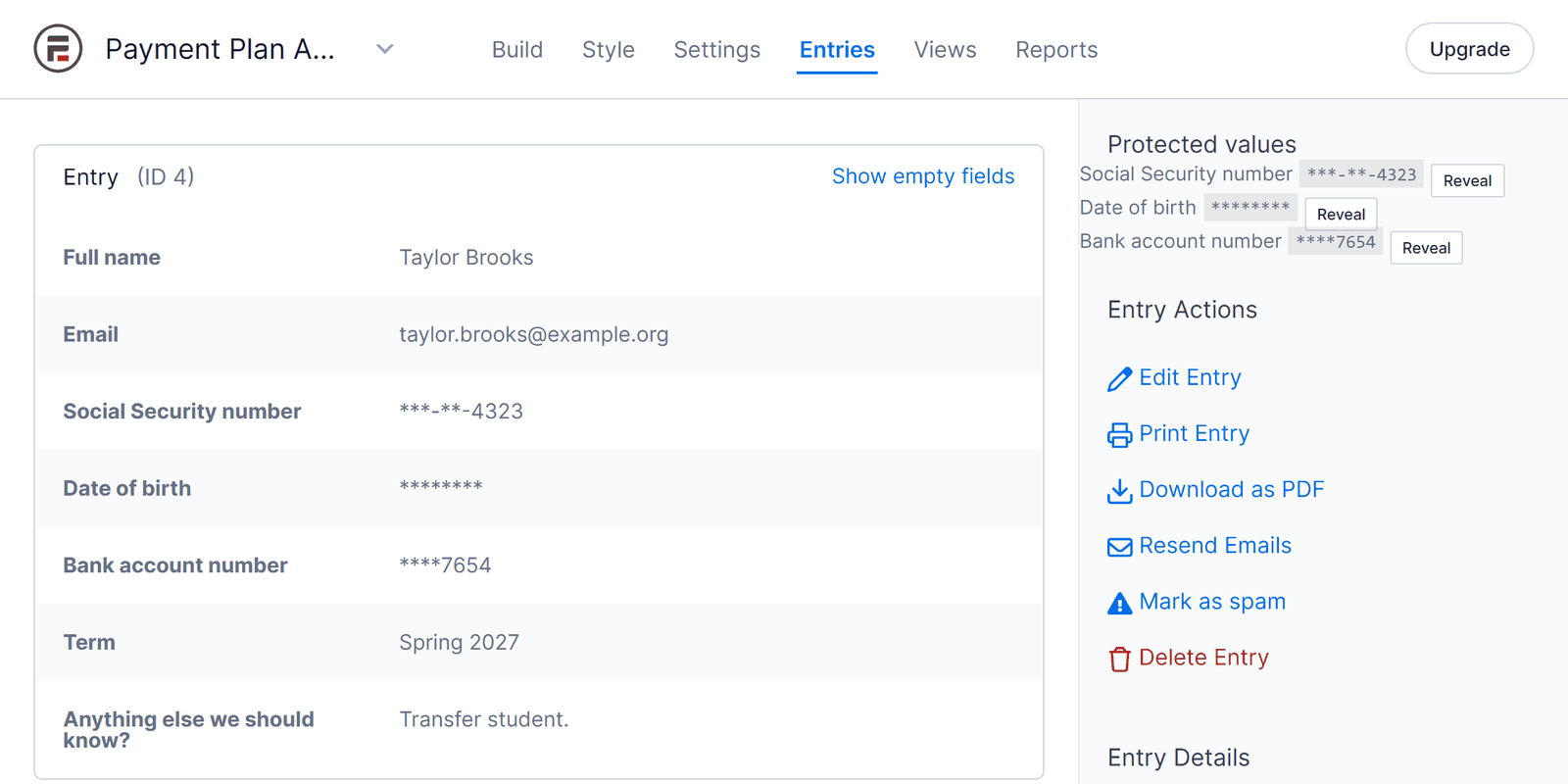
Entry screens, notification emails, CSV exports, REST APIs, PDFs and integrations all read the stored entry, so they all get the mask. There’s nothing to configure per screen.
03
Revealed by name
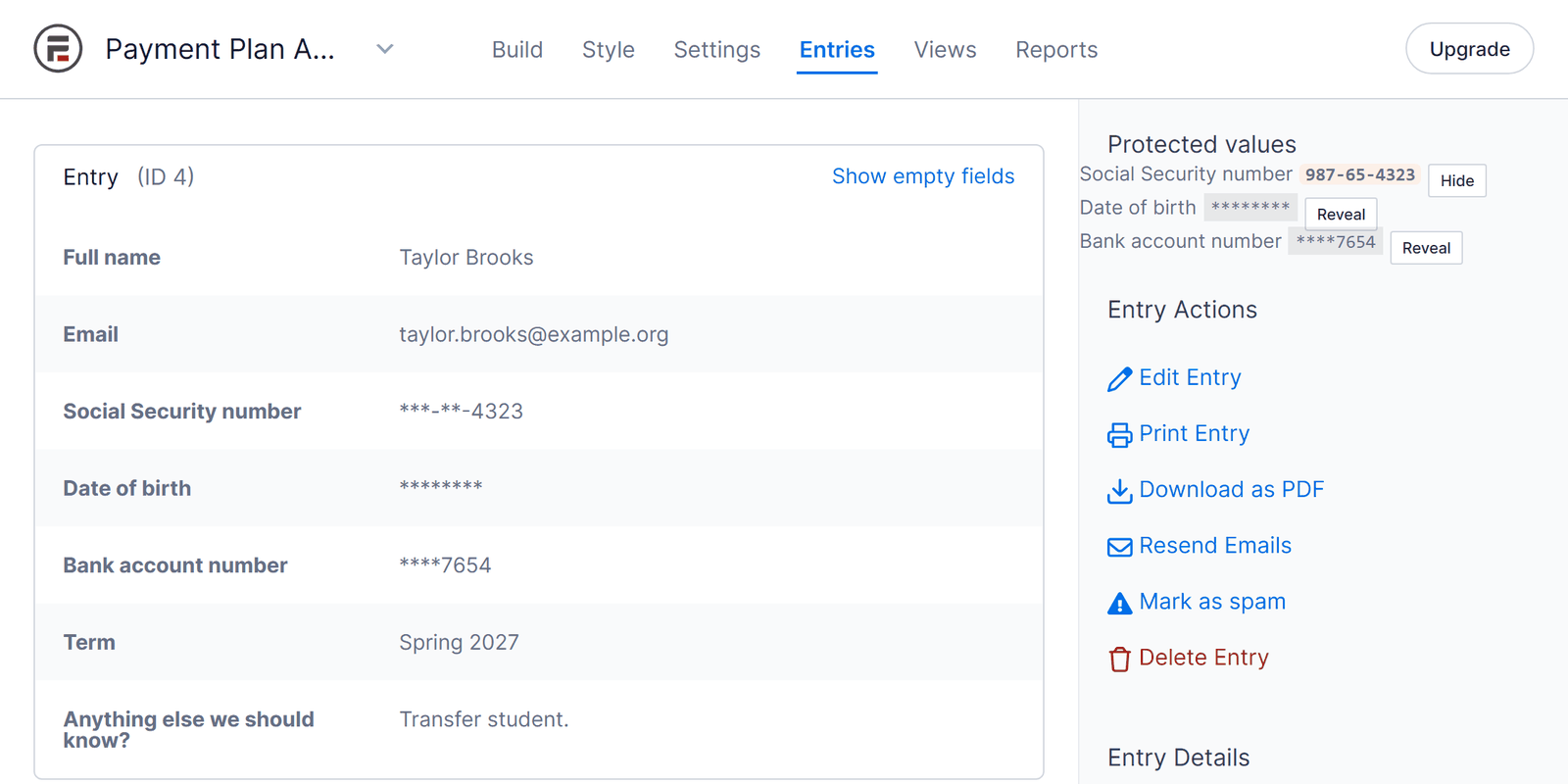
One click shows one value in place of its mask for 30 seconds and writes an audit row first. Administrators can reveal in the free plugin; Pro adds named reveal lists per form.
Inside your form tools
What your team sees
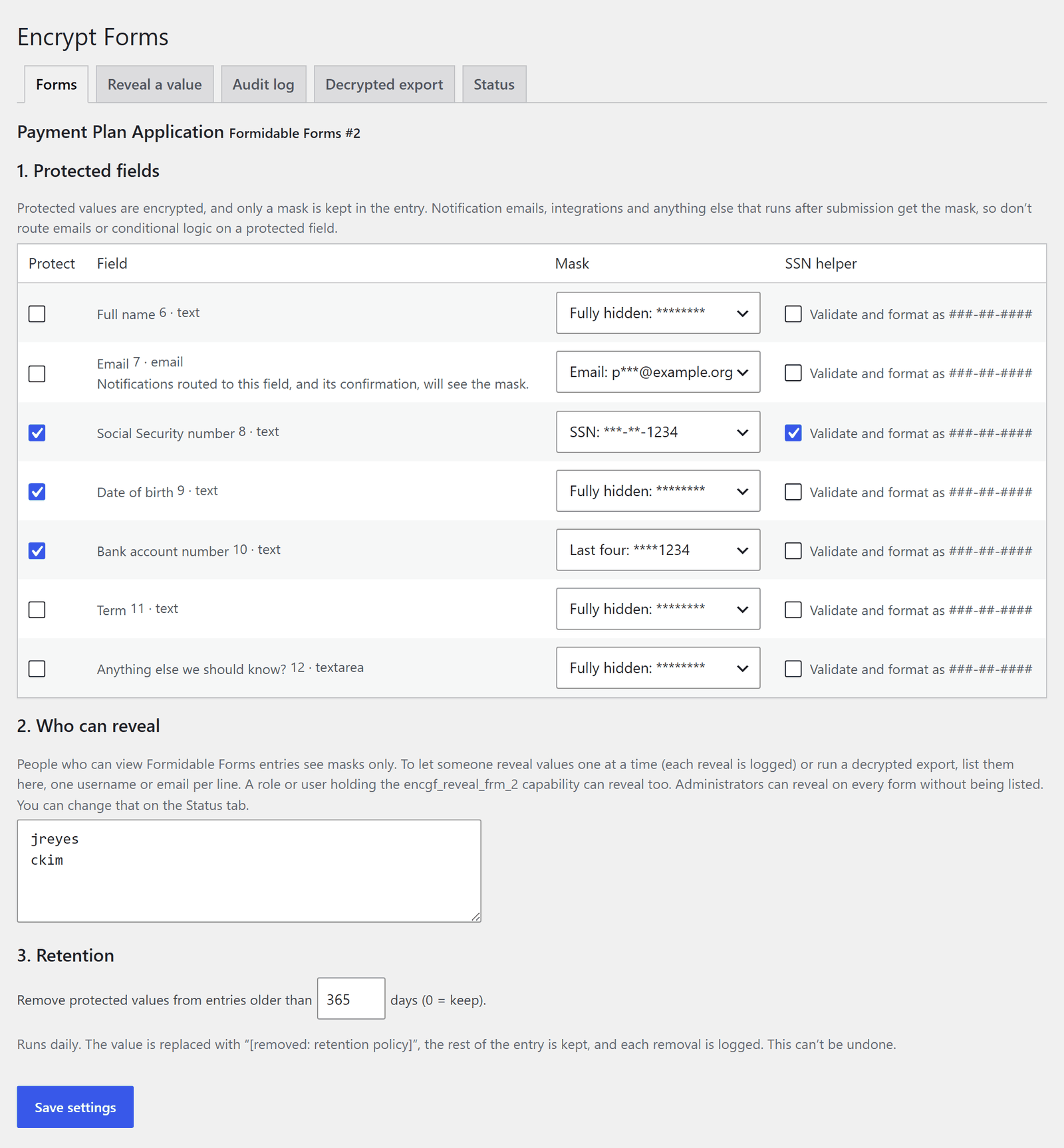
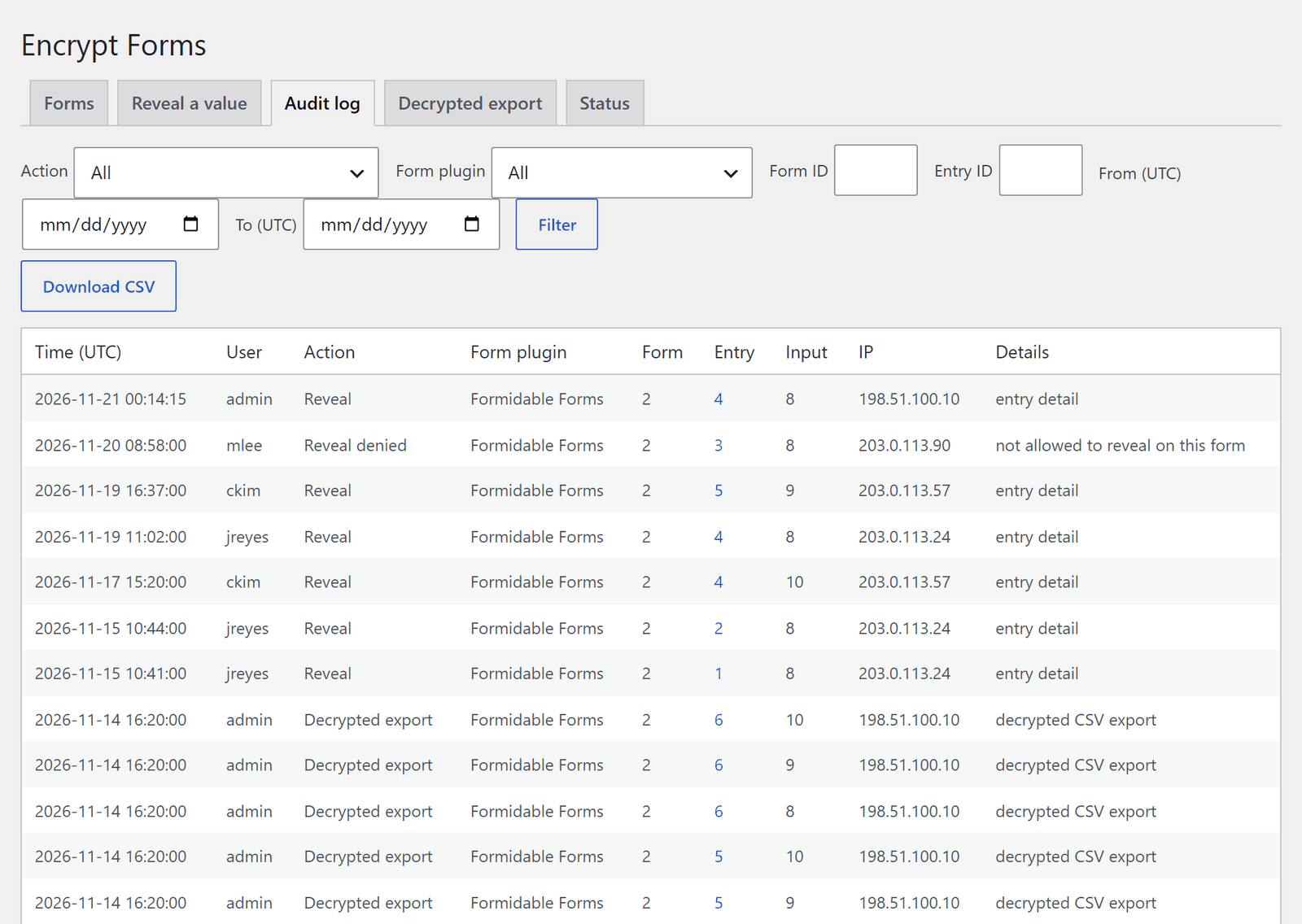
Real screens from Encrypt Forms and Pro on Formidable Forms, on a test site with invented data. On Gravity Forms the same settings sit in each form’s own Settings tab; other form plugins get Tools → Encrypt Forms. Select a screen to see it larger, and use the arrows to step through them.
Free and Pro
The lock is free. Pro is everything around it.
The free plugin encrypts, masks and logs, on its own and for good. Pro is an add-on for teams that need more people revealing, real values in exports, old entries encrypted and an audit screen to hand an auditor.
Encrypt Forms
Free · GPL
- Encrypts the fields you choose the moment an entry is saved
- Masks on entry screens, emails, exports, REST, PDFs and integrations
- You pick the fields and how each one is masked
- Administrators reveal one value at a time, and every reveal is logged first
- All eight form plugins
- Won’t protect a field until you’ve confirmed the key is backed up
- Counts the older values that aren’t encrypted yet
- A way out: write the real values back and remove it
- No license key and no outbound requests
Encrypt Forms Pro
Paid add-on · needs Encrypt Forms
- Named reveal lists per form, beyond administrators
- The audit log screen, with filters and CSV download (the free plugin writes the rows from day one)
- Decrypted exports, including real values in Gravity Forms’, Formidable’s and Flamingo’s own exports
- Encrypt the plaintext in old entries, plus an hourly sweep
- Retention rules and key rotation
- Opt specific Gravity Forms feeds in to receive real values
- A per-entry access box: who revealed or exported this entry
- Network activation on multisite
- Updates and email support
Works with
The form plugin you already use
One settings screen, one reveal list per form and one audit log, whichever form plugins your sites run.
Gravity Forms
Reveal on the entry screen; opt specific feeds in to get real values.
Contact Form 7
Stored by Flamingo or CFDB7, with one set of settings. Emails get masks.
WPForms Pro
Entries, notifications and integrations hold masks.
Elementor Pro Forms
Collect Submissions, Email and webhook actions all get masks.
Fluent Forms
Name and address parts protected separately.
Forminator
Text, email, name, address, date and number fields.
Ninja Forms
Reveal on the submission screen; editor changes are swept.
Formidable Forms
Reveal in the entry sidebar.
Something else?
Adapters are a small, documented class. Ask me about yours.
For any team that handles sensitive data
The details that matter in an audit
An audit trail
Every reveal, decrypted export, integration send and retention removal is logged with user, time, form, entry, field and IP, from the free plugin on. The log never holds the value. Pro adds the screen, filters and CSV download.
Keys you control
The key lives in a file outside the web root, never in the database. Rotate keys with one command. With no key, nothing is stored in plaintext: values are refused or replaced with a marker.
Fits your stack
It’s multisite-ready, with per-site settings, vault and log. It works alongside page caching and page builders. The free plugin makes no outbound calls; Pro checks for its own updates once you add a license.
Plans
Pro, priced per site, not per subsite
Encrypt Forms itself is free. Pro plans include a year of updates and email support, and a multisite network counts as one site. Pro is GPL and keeps working if you don’t renew; renewing keeps the updates coming. Provided as is: a license buys updates and support, not a guarantee.
Multisite network
One multisite network, every subsite. Updates and priority support for a year.
Join the waitlistOrganization
Unlimited sites and networks for one organization, including staging, plus the security paperwork packet (questionnaires, VPAT, W-9). Invoice and PO accepted.
Join the waitlistPaying by purchase order or invoice? Request a quote. W-9, HECVAT and VPAT available on request.
The honest threat model
What it's designed to protect, and what it can't
Reduces exposure from
- Database dumps, backups and staging copies
- SQL injection that reads tables
- Leaks through exports, reports and add-ons
- Over-broad access in the WordPress admin
- Values moved or altered in the database
Doesn't protect against
- An attacker who can run code on your server: they can read the key the same way the plugin does
- A stolen session of someone allowed to reveal (rate limits and the log expose it)
- Debug logs that capture values before encryption
- Copies made before you installed it
No plugin makes a site secure on its own. Encrypt Forms is provided as is, without warranty.
Questions
Common questions
Is there a free version?
Yes: Encrypt Forms itself is free and GPL. It encrypts and masks the fields you choose on every supported form plugin, lets administrators reveal values one at a time, and logs every reveal. It isn't on WordPress.org yet; join the waitlist and I'll send it when it is.
Does Pro stop working if we don't renew?
No. Pro is GPL too and keeps working. Renewing keeps updates and email support coming. The free plugin never needs a license and makes no outbound requests at all.
What happens if we lose the encryption key?
The protected values can't be recovered, by you or by me. That is the point of encryption. The setup guide has you store the key outside the web root and keep a copy in your password vault, separate from database backups.
Will it slow our forms down?
No. Encrypting one value takes a fraction of a millisecond with the libsodium library already built into PHP. Reveals and exports decrypt only what's asked for.
Can we export real values when we need them?
With Pro, yes. On Gravity Forms, tick “Decrypt protected fields” on its own Export Entries screen. Formidable’s and Flamingo’s own exports can carry real values for 15 minutes after you turn it on. Every form plugin also gets a decrypted CSV download in Encrypt Forms. Each decrypted value is logged under the name of the person exporting, and only forms they may reveal on are decrypted. Exports from everyone else, and by default, carry masks.
We have years of old entries. What about those?
With Pro, one WP-CLI command encrypts the plaintext already in your database: a dry run first, then batches, and it's safe to re-run. Readers see masks right away, and an hourly background sweep catches anything left. Old database backups still hold plaintext, so plan their expiry.
Do you guarantee it, or cover us if there's a breach?
No. Encrypt Forms is GPL software provided as is, without warranty. New Rock Digital doesn't insure, indemnify or compensate anyone for a breach, a fine or lost data, and doesn't promise it makes you compliant with HIPAA, GLBA, PCI DSS or any other rule. It's one layer of protection that you configure and test; Pro buys updates and support, not a guarantee.
Questions, paperwork or a quote?
W-9, VPAT and security questionnaires on request. Purchase orders welcome.