WordPress plugin · for handbooks, policy manuals and codes of conduct

Handbooks

Your old PDF handbook, converted automatically into an accessible, interactive web version.

Upload the PDF or Word file you already have. Handbooks rebuilds it as searchable web pages with a link for every policy, and checks every word against your original before anything goes live. Your office keeps it current in WordPress from then on.

Word (.docx) · PDF · any theme · shortcodes and Elementor widgets

Free core + Pro add-on · GPL · in development, planned for early 2027

The demo handbook, playing by itself.

Upload to web pages

Upload the PDF. Publish the handbook.

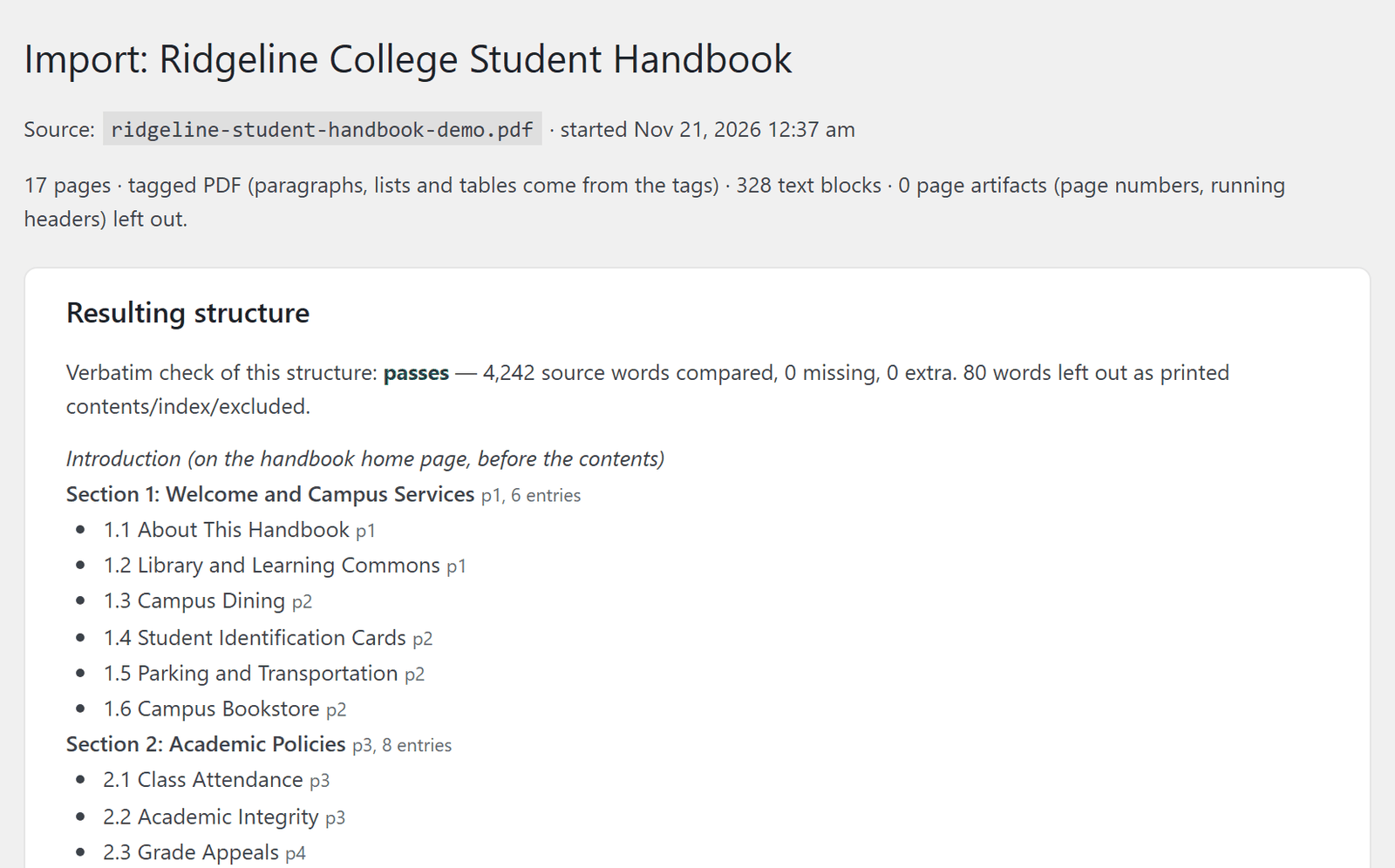
Real screens: Handbooks Pro importing the demo handbook’s PDF, then the finished handbook. Select a screen to see it larger.

The problem

The handbook is a 90-page PDF.

People open it on a phone, pinch, scroll and give up. Search engines see one file, so nobody can link to the attendance policy, only to page 37. A handbook people use every day is hard to fit into the accessibility rules’ exceptions for older PDFs. Remediation is billed per page and bought again every edition. And the converters that “clean up” text can put words in a conduct code that nobody approved.

See it work

A demo handbook you can try

A nine-section student handbook for a fictional college, imported and checked by the plugin. These play by themselves; open the demo to search it and click around.

On a phone: the contents drawer.

Contents that follow the reader

On a phone the contents become a drawer, so any entry is two taps away.

On a desktop: find on this page.

Find on this page

Type a word and the section narrows to the entries that use it, with the word marked.

Open the demo handbook

Before and after

Same words. Now a web page.

Page 6 of the demo handbook’s PDF, and the same section after import. The words match exactly; the headings became real headings, and every entry got its own link.

For the people reading it

A handbook people can actually use

On the site you already have, in your colors and fonts, on any theme.

Search inside the handbook

Results list the entries that match, and the words are highlighted when the reader arrives.

A link for every entry

Send someone straight to 3.3 Appeals, not to page 37 of a PDF. Sub-entries link to their exact spot on the page.

Contents that stay in view

The contents list follows the reader down the page and marks where they are. Find on page filters the section.

Made for phones

A contents drawer, readable line lengths and large tap targets, on any theme.

Built to WCAG 2.1 AA

Real headings and landmarks, skip links, keyboard access and contrast checks on every color choice.

Print when they need to

A clean print view of any page or the whole handbook. Pro adds a compiled, tagged PDF.

Free and Pro

The word check is free. Pro is everything around it.

The free plugin imports Word files, checks every word, and publishes a searchable handbook, for good. Pro is an add-on for offices that start from a PDF, need a compiled PDF, or have several people editing.

Handbooks (free) and Handbooks Pro compared
What you getFreePro
In Free and Pro
  • Word-for-word check before publishing
  • Up to six levels, a link for every entry
  • Search, contents, find on page, phone drawer
  • Print view
  • Search & AI settings
  • Setup wizard and checklist
Import from Word (.docx)Yes, On your own serverYes
Import from PDFNot includedYes, Through NRD’s conversion service PDF pages sent through the service count toward your plan’s yearly allowance. Word imports don’t count.
Word-for-word check before publishingYesYes
Up to six levels, a link for every entryYesYes
Search, contents, find on page, phone drawerYesYes
Print viewYesYes
Compiled PDFReaders save a PDF from the print viewTagged and bookmarked, rebuilt after every change With your cover and brand fonts. Rebuilds don’t count toward converted pages.
Next year’s revisionEdit the entries that changed, or import the new file as a separate handbookRe-import the revised file into the same handbook A word-for-word change report shows what changed. It publishes as a new numbered edition, links stay the same, and last year’s edition is archived.
PublishingLive: edits appear when savedLive, or numbered editions with an archive Edits wait for the owner, who publishes the next edition. The previous edition and its PDF move to a labeled archive.
EditorsSite administratorsPlus editors limited to one handbook
BrandYour colors, fonts and logoBrand lock: approved colors and logos only
Search & AI settingsYesYes
Setup wizard and checklistYesYes
MultisiteOne site of a networkNetwork activation
Updates and supportThrough WordPress.orgUpdates and email support

Search and AI

Found by search engines. Quoted correctly by AI assistants.

A handbook is often the first place people look for a policy, and now AI assistants look there too. Handbooks makes each page easy to find and gives assistants the official wording to quote, with settings for what they may do.

Descriptions from your own words

Each page’s search description is quoted from its first words, never rewritten. Works alongside Yoast, Rank Math, AIOSEO and others.

You decide about AI crawlers

Let AI assistants read and cite a handbook, allow search and answers but not model training, or ask them to stay out.

llms.txt and a full-text copy

A plain-text guide for AI tools, and each handbook as clean Markdown with page links, so answers quote the official wording.

Also built in: breadcrumbs and other schema.org data, sitemaps that match the pages, and a way to keep an internal handbook out of search results.

Inside WordPress

What your office sees

Real screens from Handbooks and Handbooks Pro, on a test site with the fictional Ridgeline College handbook. Select a screen to see it full size.

Plans

Pro, priced per site or network, never per subsite

Handbooks itself is free. Pro plans include a year of updates, email support and PDF conversions. Every plan is priced to fit under a typical purchasing-card limit. Purchase orders welcome.

Single site

Annual plan · founding price for the list

  • One production site (staging is free)
  • 1,000 converted PDF pages a year
  • Updates and email support

Network

Annual plan · founding price for the list

  • One multisite network, every subsite
  • 3,000 converted PDF pages a year
  • Network defaults and brand lock

Institution

Annual plan · founding price for the list

  • Every site your organization runs
  • 10,000 converted PDF pages a year
  • Run the converter on your own servers
  • Vendor packet: VPAT, HECVAT, W-9
  • Your first handbook converted with you on a call
  • Prices are published when Pro opens.
  • Converted pages are PDF pages sent through the conversion service in a license year. Word imports and rebuilding the compiled PDF don’t count. An 80-page handbook imported a few times a year uses about 300.
  • If a license lapses, your handbooks stay published: the web pages are yours. PDF import and compiled-PDF builds use the hosted service, so they need an active license.
  • Compliance Suite: Handbooks Pro and Encrypt Forms Pro together at a bundle price, coming with the launch.

Founding list

Get founding pricing

Founding prices are for people on the list when Pro opens, and stay yours while you stay subscribed. Tell me a little about your handbook and I’ll send them by email.

The honest version

What it does, and what it doesn’t

It does

  • Keep your wording exactly as your file has it
  • List everything it left out (a printed contents page, the index, page numbers), with the reason
  • Block publishing until the words match
  • Give every section and entry its own address
  • Check every color choice for readable contrast

It doesn’t

  • Make a site accessible or compliant on its own
  • Read a scanned PDF that has no text layer
  • Rewrite, summarize or “improve” your text
  • Replace your own review of what the policies say

Handbooks is provided as is, without warranty. A license buys updates, support and conversions.

Questions

Common questions

Yes. Handbooks itself will be free and GPL on WordPress.org: Word import with the word-for-word check, the reader, search, the print view, live publishing, the setup wizard and the Search & AI settings. It isn’t on WordPress.org yet; join the founding list and I’ll tell you when it is.

No. The importer only decides structure: what is a section, an entry or a heading. Then an independent reading of your file is compared with what WordPress stored, and publishing stays blocked until nothing is missing and nothing is added. There is no AI rewriting anywhere in it.

No plugin can promise that. Handbooks is built to WCAG 2.1 AA and helps you meet it: real headings, landmarks, skip links, keyboard access and contrast checks. You still own the content itself, such as alt text for images you add and clear table headers.

Word imports never do: they run on your own server. Pro sends PDFs to NRD’s conversion service. The Institution plan can run the converter on your own servers instead, for documents that can’t leave.

If you let them. Each handbook has a setting: AI assistants may read and cite it, may use it for search and answers but not model training, or are asked to stay out. Handbooks also publishes an llms.txt guide and a full-text copy so assistants quote the official wording.

Handbooks is in development. The free plugin and Pro are planned for early 2027, and people on the founding list get founding prices.

Want to try it on your own handbook?

Handbooks is in development. Tell me about your handbook and I can run it through the word check with you before launch, or ask for a quote.